
Here is the error message I get. Basically it gets all the way to the point of starting the flash and says flash failed. I power down and this message pops up, works flawlessly in v8 tho???
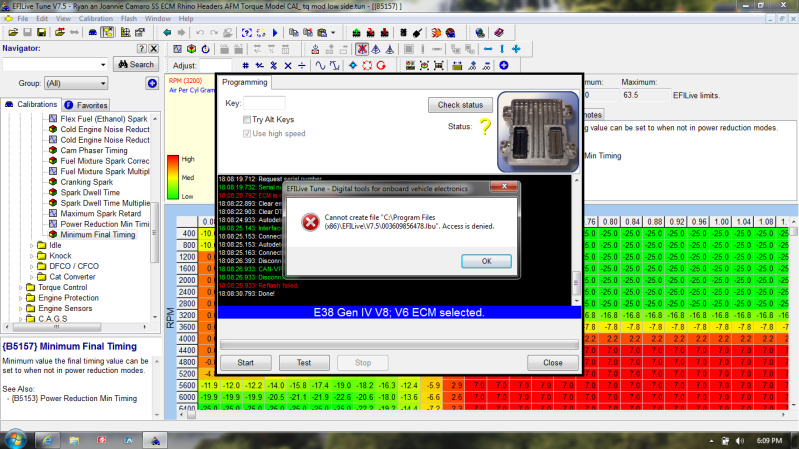


Here is the error message I get. Basically it gets all the way to the point of starting the flash and says flash failed. I power down and this message pops up, works flawlessly in v8 tho???

What is happening:Originally Posted by Rhino79

EFILive is trying to save a backup file of your VIN licenses from the FlashScan device. I.e. a list of what controllers are licensed to your FlashScan device so that if your FlashScan device is ever lost/stolen/damaged, we can "clone" a new FlashScan device with all your existing VIN licenses from that backup file.
Why is it a problem?
In previous versions of Windows, (Win2K and WinXP etc) program were allowed to create and update files in the "Program Files" folder. With the latest versions of Windows (Vista and Win7) Microsoft have changed it so that by default programs cannot create files in the Program Files folder. So when EFILive tries to create the *.lbu (license backup file) Windows security prevents it.
What can you do to get around the problem right now?
You can take ownership of the folder: \Program Files\EFILive\V7.5 (or \Program Files (x86)\EFILive\V7.5):
Right click on the V7.5 folder in Windows Explorer and select [Properties], then follow the instructions in the image below.
What is EFILive doing about it in future?
We will change the V7 software to store the *.lbu files in the \My Documents\EFILive\V7 folder.
Regards
Paul
Before asking for help, please read this.
THanks Paul, I went through the steps, will post back with results probably tomorrow.
I got fed up with Win7 paranoia pretty fast, On PC's running Win7 I have the UAC set to it's lowest setting. It fixes all these (and other) annoying problems with permissions, and of course you need to be the admin when logging in.
However, if you choose to change your UAC setting, you need to make sure you have a decent firewall, virus scanner, spy/malware detection etc (that goes without saying really).

I no longer monitor the forum, please either post your question or create a support ticket.

Okay, i did the flash using v8 and the accessories doesnt power cycle. flash time is about half of 7.5.
my crazy thought was perhaps seeing as it's about the 18~20 second mark that the power cycle happens in 7.5 and that's the time it takes v8 to flash and then cycle the power that perhaps it's something in the script?
Sorry I was being a dumbass lol, found the info on updating from 2.0.4 or something like that. And then updated a non compatible firmware after upgrading the boot block and really shit myselfhaha. All good now, I'll read the entire directions next time.
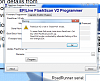
I am having a problem since upgrading software to the latest 8.2.1 version. I had plugged in previously to my 98 Corvette with no problem and uploaded the current program. After upgrading I receive a number of various errors. Can someone tell me if they have seen this and if so what the resolution is. Thanks, Ken
Ok, what firmware/bootblock are you currently using on your V2?
After a certain bb/fw, you need to use the EFILive Control Panel application to flash and NOT the V2 Programmer software (was released initially so we could program the V2 before the V8 stuff was released).
First, make sure you're running the latest and greatest software (V7.5.7 build 204 and V8.2.1 build 195) from the main downloads page Link to EFILive Software Downloads.
Try this, plug your V2 in, open V8 Scan & Tune, then click the little V2 icon that pops up near the windows clock. Then click F6 Firmware, click Update BootBlock. Wait for your V2 to enter dead-poll (2 amber LEDs flashing alternately), then click Update Firmware. Should program then reboot your V2, then you can use V8 to read/flash. Also you need to recopy all of your BBX settings if you're using any of the standalone reading/flashing/scanning features.
~Erik~
2013 Sonic RS Manual - 1.4L I4T E78, tuned, turbo mods, etc.
2008 TrailBlazer SS 3SS AWD Summit White - LS2 E67/T42, bolt ons, suspension, etc.
2002 Chevy TrailBlazer LT 4X4 Summit White - 4.2L I6 P10, lifted, wheels, etc.
I changed everything as described on post #95 and just got a chance to try reflashing. Still having the same issue. Any ideas?
Did you try right-clicking on the EFILive Tune Tool icon and selecting "Run as Administrator"?
Regards
Paul
Before asking for help, please read this.
 Posting Permissions
