



 Hosting an Image
0. arrange Scan/Tune tool windows to show the point you want to make (make 2" smaller than the screen width);
1. press PrintScreen or PrtScrn on your keyboard;
2. paste into an image editor such as IrfanView or Greenshot;
3. crop the image and add annotations as required (blur out VIN/serial/license numbers);
4. save the image as a .png file;
5. upload the image to an image hosting site such as ImageShack;
6. the hosting site will give you a link to the image you uploaded, copy this link;
7. on the thread reply toolbar click the Insert Image button, paste the link into the box, click Insert Image;
8. finish typing your reply, and submit the reply.
From image on public website (url):
paste the url from your hosting website (e.g. ImageShack, PhotoBucket, etc).
From Image on your PC:
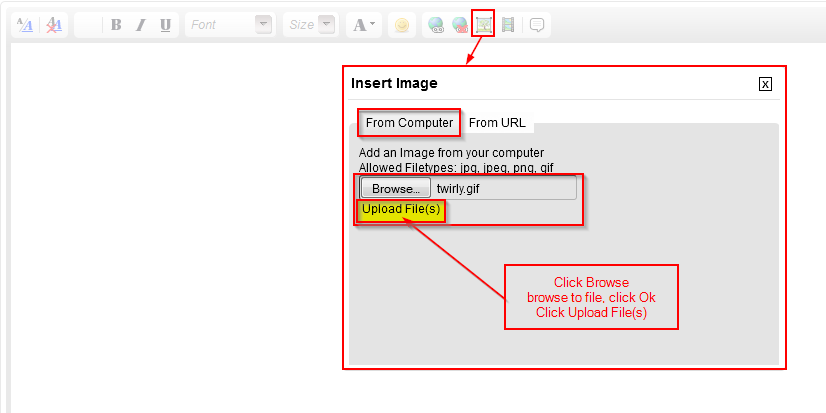

 Reply With Quote
 Newer forum software attachment instructions
 Originally Posted by joecar


